We ran our audit on 66 well-known online stores the week before Black Friday: 50 on WooCommerce and 16 on Shopify. Across all 66, the median score was 49 out of 100: 46 for the WooCommerce stores and 67 for the Shopify stores. Seven stores scored 70 or more, which our audit calls agent-ready. Thirteen scored under 40.
The audit asks one question: can an AI shopping agent such as ChatGPT, Gemini or Perplexity find a store's products, read what they are, and match them to what a shopper asked for? It reads only what any visitor can see: the public product catalog, product pages, robots.txt and the home page.
This post gives the numbers in aggregate. We don't name any store. The method and its limits are at the end. For a larger look at WooCommerce alone, see our report on 127 WooCommerce showcase stores.
The score spread
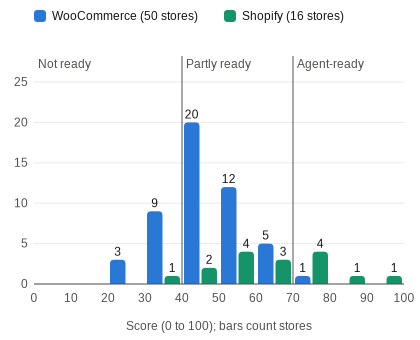
The score here covers the eight checks we can make the same way on both platforms: barcodes, descriptions, product markup, images, categories, crawler access, ratings and titles, weighted as in our audit.
| WooCommerce (50 stores) | Shopify (16 stores) | |
|---|---|---|
| Lowest score | 25 | 36 |
| Middle half | 41 to 52 | 51 to 73 |
| Median | 46 | 67 |
| Highest score | 79 | 94 |
| Not ready (under 40) | 12 | 1 |
| Partly ready (40 to 69) | 37 | 9 |
| Agent-ready (70 and up) | 1 | 6 |
The chart's counts:
| Score | WooCommerce stores | Shopify stores |
|---|---|---|
| 0 to 9 | 0 | 0 |
| 10 to 19 | 0 | 0 |
| 20 to 29 | 3 | 0 |
| 30 to 39 | 9 | 1 |
| 40 to 49 | 20 | 2 |
| 50 to 59 | 12 | 4 |
| 60 to 69 | 5 | 3 |
| 70 to 79 | 1 | 4 |
| 80 to 89 | 0 | 1 |
| 90 to 100 | 0 | 1 |
Most of the gap between the platforms comes from defaults, not effort. Shopify gives every variant a barcode field that its product feed shows, and most Shopify themes print full product markup. A WooCommerce store has to get both from its theme or a plugin.
What most stores get right
Crawler access is not the problem. Only 1 of the 66 stores blocks an AI search or shopping bot from its product pages in robots.txt. (Blocking AI training bots such as GPTBot costs nothing in our score: a store can say no to training and still be found by shopping agents.)
Categories are mostly fine too: 78% of the WooCommerce stores and 88% of the Shopify stores put at least 8 in 10 products in a real category or product type, not "Uncategorized".
The most common gaps
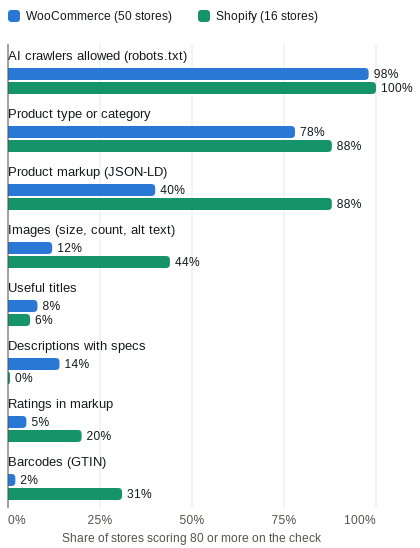
| Check | WooCommerce stores scoring 80+ | Shopify stores scoring 80+ |
|---|---|---|
| AI crawlers allowed (robots.txt) | 98% | 100% |
| Product type or category | 78% | 88% |
| Product markup (JSON-LD) | 40% | 88% |
| Images (size, count, alt text) | 12% | 44% |
| Useful titles | 8% | 6% |
| Descriptions with specs | 14% | 0% |
| Ratings in markup | 5% | 20% |
| Barcodes (GTIN) | 2% | 31% |
Barcodes. 77% of the WooCommerce stores we could check showed no valid barcode (GTIN, UPC or EAN) on any sampled product. Shopify stores did better, with a median of 63% of products carrying one, but a quarter of them had none at all. A barcode is how an agent knows two listings are the same product, so it can compare prices and stock. It's the biggest single item in our score.
Brand. 72% of the WooCommerce stores name no brand anywhere an agent can read it: not in a brand field, not in an attribute, not in the page's markup. Shopify always has a Vendor field, so we can't compare the platforms fairly here, and brand is left out of the chart above and of the score.
Descriptions. Only 14% of WooCommerce stores and none of the Shopify stores scored 80 or more. The median Shopify store scored 30: short descriptions, often without a list of specs such as materials, size or compatibility. An agent answering "is this jacket waterproof?" needs that sentence to be in the description.
Ratings. 82% of the WooCommerce stores and 73% of the Shopify stores show no review rating in their product markup.
Titles. On the median store on both platforms, only about 3 in 10 product titles were 30 characters or more. A short name is fine for a shopper already on the page, and thin for an agent choosing from a list: a title that adds the brand or a key detail (size, colour, material) gives it more to match.
Policies. Fewer than half of the WooCommerce stores (44%) link a returns or refund page from their home page, and 42% link a shipping page; every Shopify store we read linked its refund policy. Both are questions shoppers put to an agent before they buy.
What the best stores do
We compared the top fifth of each platform by score with the rest.
The 10 best WooCommerce stores (all 54 or more) differ from the other 40 in four places:
- Fuller descriptions. Median description score 71, against 39.
- Fuller markup. Median Product markup score 84, against 58.
- Better titles. Median 61% of titles a useful length, against 25%.
- They name the brand. Not part of this score, but the difference is large: median score on brand, colour and size 94, against 0 for the rest.
Even the best WooCommerce stores had few barcodes (median 13% of sampled products) and no ratings in their markup.
The 3 best Shopify stores (all 76 or more) had a barcode on every sampled product, a rating in every sampled page's markup, and fuller image sets. Their descriptions were no better than the rest.
None of this is exotic. The best stores aren't using special agent tools. They have filled in the catalog fields that already exist.
The five fixes worth the most
In order of the points they carry in our full audit:
- Add barcodes. Put the GTIN, UPC or EAN on every product and variant, and make sure your product markup shows it. On WooCommerce, our guide to adding GTINs to WooCommerce products shows where. Check which products are missing one with the free plugin (WooCommerce) or the free Shopify audit.
- Write descriptions with specs. Aim for 150 words or more with a list of the facts a shopper asks about: materials, dimensions, fit, compatibility, what's in the box. Keep each one unique. The plugin and the Shopify audit list the products with thin descriptions.
- Name the brand. On WooCommerce, use the built-in Brands (WooCommerce 9.6 and later) or a Brand attribute, and give clothing and shoes a colour and size. On Shopify, set Vendor to the real brand, not the shop's name. Our post on the attributes AI assistants actually use covers the rest. Then re-run the plugin or the Shopify audit.
- Make your product markup complete. Every product page should carry Product JSON-LD with the price, currency, availability, image and brand or barcode. Most current themes and SEO plugins do this; older or heavily customised ones don't. The plugin and the Shopify audit check a sample of your product pages.
- Put ratings in the markup. If you show reviews, use a reviews plugin or app that adds the rating (aggregateRating) to the product markup, not only stars on the page. The plugin and the Shopify audit check whether yours does.
Nothing here needs to happen before Black Friday. Changing product data in your busiest week is a risk of its own. But it's a good week to run the audit and see where you stand, and the fixes are worth doing in December, when it's quiet.
How we did it
- Stores. 50 WooCommerce stores from WooCommerce.com's public showcase whose product catalog is public, and 50 well-known Shopify brands, each picked by a fixed hash of the domain rather than by hand. Of the 50 Shopify stores, 16 could be audited: 23 refused our requests (Shopify rate-limits the network we ran from), 6 are no longer on Shopify, and 5 use a custom storefront that doesn't publish its catalog. So the Shopify numbers are from a small sample.
- What we read. Up to 100 products per WooCommerce store and 250 per Shopify store, 8 sampled product pages each, robots.txt and the home page. One request at a time, with a pause of a second or more between requests, on November 21, 2026. No logins, carts or forms.
- Scoring. The checks and weights of our free Shopify audit, less four we can't make fairly from WooCommerce's public data: brand, colour and size (Shopify fills in a brand for every product; WooCommerce doesn't), each variant's own SKU and price (WooCommerce's public catalog doesn't show them), offer prices (some WooCommerce catalogs show 0 for a priced product) and the agent protocol file (Shopify publishes it for every store). The eight that are left are reweighted to 100. The full audit gives the same picture: medians of 42 for WooCommerce and 70 for Shopify.
- Limits. A WooCommerce barcode only counts when it's in the product page's markup. Shopify's catalog shows barcodes even when the page doesn't, so Shopify's barcode numbers read a little higher by method. These are showcase stores and well-known brands, not a random sample of all stores, and a score measures whether the data is complete and readable, not whether any agent will recommend a product.
The raw results, one line per store, are kept with the site's code so every number here can be checked. We don't publish them, because they name the stores.
Want your own score? Download the free plugin for WooCommerce or Easy Digital Downloads, or run the free Shopify audit. Both are free and need no account.